Pinardin: Parental Control
- 4.6
- Rating
- 100.00K
- Installs
- Free
- Price

 Analysis by App-foxy
Parents usually do not need another complicated dashboard; they need a clear way to understand what is happening on a child’s connected device and respond without turning every conversation into an argument. That is the space where Pinardin: Parental Control tries to help. It is a free parenting app from Pinardin, built around parental control, online safety, and GPS tracking rather than entertainment or social networking.
I approached it as a practical family tool, asking a simple question: can it make everyday supervision calmer and more manageable? My impression is that it can be useful for parents who want several safety-related functions in one place, especially when location awareness matters as much as screen habits. It is not a magic substitute for trust, conversation, or the operating system’s own family controls, but it offers a more focused starting point.
The app has a 4.6 average from around 8,000 ratings and has passed 100,000 installs. Those figures suggest that Pinardin has found a real audience, although they do not remove the need to test it carefully with your own family setup. It is marked for Everyone, and the current version is 2.4.0, which makes it approachable for a broad range of users. The important practical detail is that the app is free to install, while in-app purchases range from $9.99 to $169.99 per item, so I would review the available options before building a long-term routine around it.
You May Also Like

 Blood Strike: 2.5 Anniversary
Blood Strike’s Loadouts Turn Every Drop Into a Tactical Gamble
A close look at Blood Strike’s custom loadouts: how fast access to signature weapons reshapes its battle royale rhythm, rewards preparation, and narrows the gap between fights.

 Pandora - Music & Podcasts
Pandora’s Music Is Easy to Start, but Harder to Recover
Pandora’s strength is its low-effort path from a seed to a station. Its weak spot is how much confidence it asks you to place in connection, setup, and quiet recovery.

 8 Ball Pool
 Is Built on Rivalries, Rematches, and Routine
A close look at the rivalries, rematches, shared routines, and unanswered safety questions that turn a quick pool match into a persistent mobile community.

 Samsung Music
’s Quiet Strength Is Playing What You Already Own
Its reach comes less from spectacle than from dependable access to a personal library. That simplicity is both the app’s strongest retention engine and its ceiling.

 AccuWeather: Weather Radar
AccuWeather Review: A Quick, Clear Forecast for Everyday Decisions
For everyday plans, the best forecast is the one you can understand quickly. AccuWeather makes rain timing, radar, and local conditions easy to act on, with a few trade-offs.

 Hill Climb Racing
Why Hill Climb Racing Still Turns Crashes Into One More Run
A tiny car, a bumpy hill and one more upgrade: Hill Climb Racing keeps resurfacing because its simple chaos makes every near-miss feel personal.
More From Our News Desk



How Pinardin feels in everyday parenting
The strongest idea here is consolidation. Instead of jumping between a location tool, a screen-time solution, and separate safety settings, a parent can begin with one parenting-focused app. That does not automatically make it better than dedicated alternatives, but it can reduce the mental overhead of managing several services.
In a realistic weekday scenario, I can imagine using it before a child leaves for school, checking the information that matters for the journey, and then looking again when the child should have arrived. Later, the same parent may use the safety controls when homework begins or when the household is trying to establish a calmer evening routine. The value is not in opening the app constantly. The value is in having a familiar place to check when a specific concern appears.
I would be careful about introducing it as a surveillance tool. Children are more likely to cooperate when the purpose is explained plainly: safety on the way home, reasonable boundaries around online activity, and a shared plan for emergencies. Pinardin can support that agreement, but it cannot create it. A parent who installs it secretly or uses every alert as evidence in an argument may end up with more conflict rather than more safety.
What speed means for a parental-control app
Perceived speed matters differently here than it does in a game. I do not expect instant animation or a high-performance interface; I expect the app to open without confusion, show the relevant information quickly, and avoid making me repeat the same setup every time. Pinardin’s purpose is practical, so unnecessary waiting would be especially frustrating when a parent is checking on a child who is late.
My advice is to judge responsiveness during ordinary use rather than during a single quick test. Open it when the family is not under pressure, move through the safety and location areas you actually plan to use, and learn where the important information appears. That preparation is a small but valuable step: in a stressful moment, familiarity is often more important than having the most feature-rich service available.
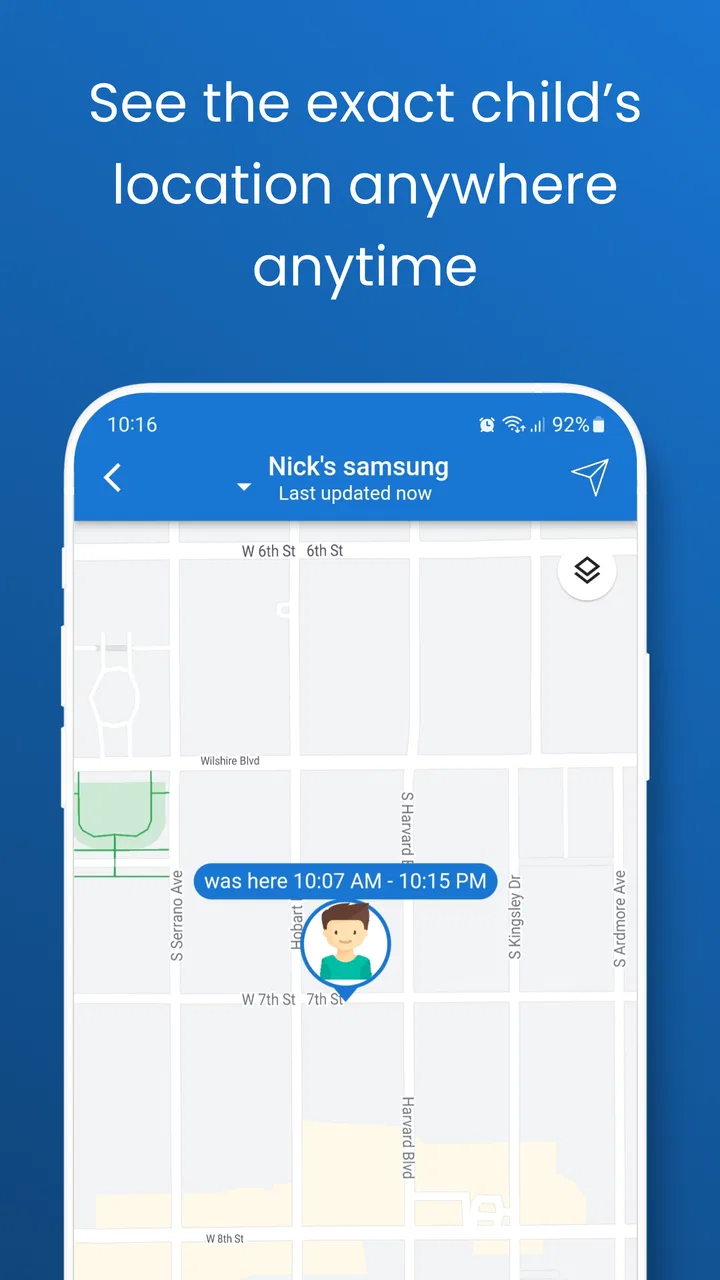
There is also a natural limit to what any location-based parenting app can feel like in real life. Information depends on the connected devices involved, their network conditions, and the child’s situation. A screen that appears slightly behind reality is not automatically an app failure, and a parent should not treat a location display as a perfect live view. Pinardin is best used as a support for sensible decisions, not as a replacement for calling the child or contacting another responsible adult.
Heavy-use moments and family routines
The busiest moments are likely to be transitions: leaving home, arriving at school, traveling to an activity, or preparing for bedtime. Those are exactly the times when several family members may be checking information, changing expectations, or asking for reassurance. A useful workflow is to decide in advance what deserves attention and what does not.
For example, I would separate “check-in” behavior from “constant monitoring.” A parent might check before a child’s expected arrival and again if the child is unusually late. That is less exhausting than repeatedly refreshing the app. It also gives the child a clearer sense of what the family has agreed to. The non-obvious trade-off is that more supervision is not always better supervision: excessive checking can create anxiety for the parent while doing little to improve safety.
Online safety can also become heavy use, not because the application is necessarily demanding, but because family rules take time to configure and explain. Start with a small number of boundaries that everyone understands. If the household tries to manage every possible risk at once, the app may become another source of arguments. Pinardin works better when it is part of a simple routine than when it is treated as a complete parenting system.
Location tracking deserves the same restraint. It is useful for a child traveling independently, but it should not be the only plan for a child who is missing, in danger, or unable to communicate. Keep ordinary emergency contacts and agreed meeting points in place. The app can add context; it should not become the family’s sole safety procedure.
Reliability, recovery, and what to do when something looks wrong
Reliability in this category is not just about whether the application launches. It is about whether parents can interpret what they see and recover gracefully when information is delayed or a device is unavailable. A responsible setup includes a backup habit: if the displayed information does not match the child’s expected situation, contact the child directly instead of repeatedly assuming the screen is current.
I would also create a short household checklist before relying on the app. Make sure the parent knows which account or device is being supervised, confirm that everyone understands the agreed rules, and test the normal check-in routine at a convenient time. This is one of the most useful ways to discover friction early, when nobody is worried or rushing to an appointment.
Recovery is especially important after a phone restart, a network interruption, or an app update. I would not wait for a genuine emergency to discover that a family member has forgotten the setup steps. Reopen the app after routine changes, verify that the expected child profile or device is visible, and keep the support path available through the developer, Pinardin, if a technical problem persists. These are ordinary precautions, but parental tools deserve them because a small misunderstanding can feel much larger when a child is late.
The current version is 2.4.0, so keeping the app updated is sensible when updates are available through the platform. At the same time, updating should be treated as a reason to perform a quick check, not as proof that every previous setting will feel exactly the same. A minute spent reviewing the arrangement can prevent an unpleasant surprise later.
Device constraints and the cost of convenience
Pinardin supports Android 7.0 and newer. That is helpful for families using older Android phones, but compatibility alone does not tell me how every device will behave. Older hardware may feel less comfortable with any modern app, and a phone with limited battery or unreliable connectivity can weaken the usefulness of location and safety information regardless of the application itself.
Resource demands are therefore best considered as part of the whole family setup. If a child’s phone is already struggling with battery life, storage, or connectivity, adding a parental-control tool may make the daily experience more sensitive to those limitations. I would watch battery behavior during the first few days, especially on the device being supervised, and avoid assuming that a location feature can work well when the phone is frequently offline or powered down.
There is a privacy and autonomy trade-off too. A parent may value reassurance, while an older child may see continuous tracking as intrusive. Pinardin is not the right choice for families unwilling to discuss that balance. In those homes, the operating system’s built-in family features may be preferable because they can feel more integrated and less like an additional service. A dedicated app becomes more attractive when the family specifically wants a parenting-centered place for online safety and location-related oversight.
The purchase model also deserves attention. The app is free at the starting point, but the listed in-app purchase range reaches from $9.99 to $169.99 per item. I would identify which functions the family actually needs before paying for anything, then consider whether the cost matches the length and seriousness of the intended use. A family looking only for a basic occasional check may not need the same level of access as a parent managing regular independent travel.
Who will benefit most, and who should choose another route
Pinardin makes the most sense for parents who want a single parenting-oriented app that brings online safety and GPS tracking into the same conversation. It may be particularly useful when a child is beginning to travel to school, sports, or friends without an adult, and the family wants a shared safety routine rather than a collection of disconnected tools.
It is also a reasonable option for parents who find separate services overwhelming. One focused app can be easier to remember and explain, especially in a household where more than one adult helps with supervision. The key is to keep the arrangement understandable: decide who checks information, when checks are appropriate, and what action follows a concern.
I would look elsewhere if your priority is a highly specialized solution. Families mainly interested in detailed screen-time scheduling may prefer the controls built into their phone platform or a service dedicated to that single job. Parents who need school-managed device administration, extensive reporting, or a formal organization-wide system should not assume that a consumer parenting app will cover those needs. Pinardin is better viewed as a family safety companion than as a complete technical management suite.
I would also skip it if the household cannot maintain the necessary communication around tracking. Technology cannot solve a disagreement about boundaries. If a child is old enough to have a strong opinion about location sharing, that conversation should happen before installation, not after the first uncomfortable check.
Practical setup habits that improve the experience
My first tip is to begin with one clearly defined use case. If the immediate concern is the journey home from school, establish that routine before adding more expectations. This makes it easier to tell whether Pinardin is genuinely helping, and it prevents a complicated first week filled with rules nobody remembers.
My second tip is to distinguish information from action. Seeing a location or safety-related status does not always require an immediate message. Decide what counts as a genuine reason to contact the child and what can wait. That simple distinction protects the child’s independence and keeps the parent from turning the app into a source of constant interruptions.
My third tip is to test recovery deliberately. At a calm time, have the parent close and reopen the app, check the normal workflow after a connection change, and confirm that everyone knows what to do if the information appears delayed. This is more useful than assuming the app will always be available in exactly the right form.
Finally, review the arrangement as the child grows. A setup that feels appropriate for a younger child may feel excessive for a teenager. The best result is not maximum control; it is a gradual move toward responsible independence. Pinardin can remain useful during that transition if the family adjusts its expectations instead of leaving the strictest settings in place forever.
My performance verdict
After considering the app as a daily parenting tool, I see its main strength in the combination of online safety and GPS tracking within a family-focused experience. The free entry point makes it easy to explore, and the broad Android compatibility helps families with older devices. Its 4.6 average and more than 100,000 installs also show that it has attracted meaningful interest, though I would still judge it by how naturally it fits your household rather than by popularity alone.
The limitations are practical rather than dramatic. Location information should never be treated as perfectly live, older or poorly connected devices can affect the experience, and the purchase range means the free starting point may not represent the full long-term cost. Parents must also invest time in communication, testing, and sensible boundaries. Without those habits, even a well-designed parenting app can become confusing or intrusive.
My recommendation is cautious but positive: try Pinardin if you want a focused place to support family safety and location awareness, especially during a child’s first steps toward independent travel. Use it with a clear agreement, a backup contact plan, and realistic expectations about device and network limits. Its best role is a calm layer of support, not a substitute for trust or direct communication. For families that want exactly that balance, Pinardin is worth exploring; for those seeking highly specialized device administration or a completely built-in solution, another option may fit better.
Because it is free to install and rated for Everyone, the sensible approach is to start modestly, learn the workflow, and decide only afterward whether any paid option is justified. That gives you a fair view of its speed, stability, and usefulness in your own routine without committing the family to a more complicated system than it needs.
FAQs for Pinardin: Parental Control
01What features does Pinardin: Parental Control offer?
Pinardin: Parental Control provides a comprehensive suite of features designed to help parents manage their children's device use. It includes screen time management, app monitoring, web filtering, location tracking, and instant alerts. Parents can customize settings according to each child’s needs, ensuring a balanced approach to technology use.
02Is Pinardin: Parental Control compatible with both Android and iOS devices?
Yes, Pinardin: Parental Control is available on both Android and iOS platforms. The app ensures a seamless experience across different devices, allowing parents to manage settings from their smartphone or tablet. This cross-platform compatibility makes it versatile for families using multiple types of devices.
03How does Pinardin: Parental Control ensure the privacy of my family’s data?
Pinardin: Parental Control prioritizes user privacy by employing advanced encryption technologies. All data is securely transmitted and stored, ensuring that personal information remains confidential. The app adheres to strict privacy policies and does not share data with third parties without explicit consent.
04Can I monitor multiple devices with a single Pinardin account?
Yes, Pinardin allows you to manage multiple devices from a single account. This feature is particularly useful for families with several children, as it enables parents to oversee all connected devices through a unified dashboard. Custom settings can be applied individually to each device.
05What happens if my child tries to uninstall Pinardin: Parental Control?
Pinardin: Parental Control has built-in measures to prevent unauthorized uninstallation. If a child attempts to remove the app, parents will receive an instant alert. The app also requires a secure password to be uninstalled, ensuring that only authorized users can make significant changes.
Pros
- User-friendly interface for easy setup
- Comprehensive monitoring features
- Customizable screen time limits
- Real-time location tracking
- Supports multiple devices
Cons
- Limited free version features
- May drain battery quickly
- In-app purchases can be pricey
- Requires stable internet connection
- Some features need manual updates

Pinardin: Parental Control
Gallery